Every church is different, and Domo adapts to yours. From Settings you can give it your identity and show only what you use.
How to get there
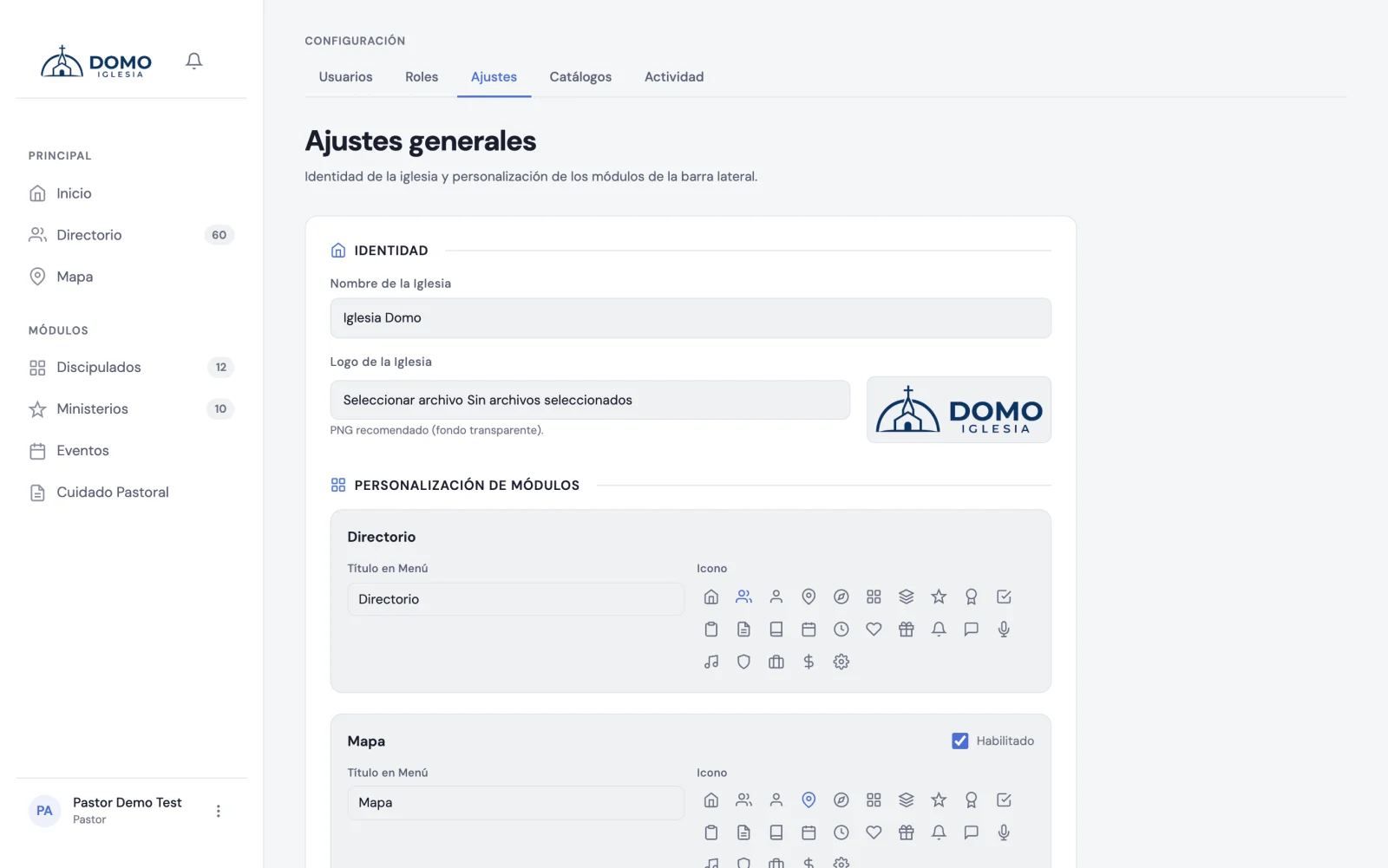
In the sidebar, go into Settings and open the Settings tab.
Your church's identity
- Church name — appears in the sidebar, on the sign-in screen and in the PDFs you export.
- Church logo — PNG or SVG with a transparent background, up to 2 MB. Landscape or square logos both work: square ones are shown next to the church name, landscape ones on their own.
- Dark theme logo (optional) — if your logo gets lost on a black background, upload a light variant here. Domo switches between them according to each person's theme. If you don't upload one, the main logo is used in both themes.
- Accent color — tints buttons, links and active states across the whole app, in both themes. The palette colors are calibrated so text stays legible; pick the one closest to your church's.
Each logo has its own Change and Remove buttons, in case you uploaded the wrong one or want to go back to plain text.
Regional: dates, times and language
The Regional block defines how dates and times read across the app:
- Time zone — your church's. It defines what "today" means for attendance, tasks and reports.
- Default language — the language new accounts and the sign-in screen start in. Each person can then choose their own in My Profile.
- Time format — 24 hours (19:30) or AM/PM (7:30 PM).
- The week starts on — Sunday or Monday. It's the day the calendar grid starts on.
Your church's campus
Under Campus you enter the contact details and the location:
- Campus address — as you type it, pick one of the suggestions to pin the point on the map. The Map shows the campus as a reference point, so you can see how far each family lives.
- Contact phone.
- Website or social media.
Adapting the menu modules
You can adjust every module in the sidebar:
- Rename it — if your church calls something differently (for example, "Cells" instead of "Discipleships", or "Life groups" instead of "Ministries").
- Change its icon — choosing from the available options.
- Turn it on or off — to hide from the menu the modules you don't use (like the Map or Ministries).
The Directory can't be turned off: it's the foundation everything else rests on.
Inside Discipleships and Ministries there are also two behavior switches:
- Enable co-leader — lets you assign a co-leader or assistant. Discipleships can have several; ministries, only one.
- Enable target size — lets you mark the ideal number of people per ministry.
The Worship module
Worship is an optional module that starts off. Turning it on puts it in the sidebar and lets you plan each service's program: the liturgy per service type, who's in charge of each moment, and the history of what's taught. When you turn it on, Domo seeds a base liturgy that you then edit to taste.
A tip
Less is more: if your church doesn't use a module, hide it. A shorter menu is easier for your whole team to use, especially for those just starting out.